Thursday, July 19, 2012

QR Code Generator


Last week I had the opportunity to work with some tremendous educators from across New Hampshire at EdTechTeam's -  NH Google Bootcamp.  I had a ton of fun working with Richard Byrne, Alice Barr and Allison Mollica throughout the week.

One of the tips that Richard shared was using the URL shortner http://goo.gl One of the handy features of that service is that it automatically creates a QR Code for the site

This got me thinking about other ways to accomplish this and how to easily generate QR Codes that others can use.  So I put together a Google Form QR Code Generator.  


You can copy and paste addresses into the form, refresh the page and see the results below. The QR image can then be downloaded and shared.


You can check out an example of what it would look like embedded into a site here:

If you are looking for more specific info on how to work with Google's Chart tools here: https://developers.google.com/chart/infographics/docs/qr_codes

Friday, June 29, 2012

Summer Technology Institute '12

I've had a fantastic time this week at University of Maine's Summer Technology Institute. Working with about one hundred educators from around the state.  


There were a number of highlights this week and one of them was having Channel 5 visit and interview my students who have helped support the teachers.

Saturday, June 16, 2012

The State of Tech "PD in your PJ's" - Managing Google Docs in the Classroom

I'm looking forward to hosting a Google Hangout for The State of Tech on "Managing Google Docs in the Classroom." 


Please join me Saturday, June 16th 1:00 EST live in a Google Hangout or by watching the recorded stream.


Updated
The video of the session:


Link to supporting resources: tinyurl.com/managedocs

Tuesday, June 05, 2012

Example of Google Docs in Action.

Mr. Hanish uses Google Docs to handle group work with his class.


This example of work together on an essay and seeing how it benefits all the students. Not only does it show how the legwork falls upon the student. That way they are learning how to digitize analog (if I can call it that) work, and are responsible for owning their portfolios.


For an outline of all the videos in the context of a larger educational framework, please visit:

Monday, May 07, 2012

On Air Educational Hangouts

Here are the videos for the Google Education On Air event. One of the options that's being rolled out is the ability to broadcast a hangout. You are able to have up to 10 people in the conference and broadcast to the rest. This will be unquestionably valuable when it is enabled for everyone. I can see online courses using this tool to store class discussions and share it with others.

Using Google Apps for Education to Manage Digital Portfolios


These resources are referenced in the hangout, as well as the the slideshow and additional videos:


Using Google App for Education to Create Online Courses.


These resources are referenced in the hangout, as well as the the slideshow and additional videos:

Thursday, May 03, 2012

More than a sum of its parts . . .

How important is it to push our students beyond their academic comfort zone? Beyond the usual set of rules played out in the 'game of school.'  Personally I believe pushing our students is a crucial aspect of our charge as educators.

I recently worked with a Language Arts class on a project that took an individual Winslow Homer illustration, courtesy of the Portland Museum of Art, and create a video that took the viewer through the  stylistic elements that Homer conveyed in the image. Copyright concerns were addressed and the students create videos that included an image, narration, some sound effects and a music track. We talked a lot about the difference between being a cook and being a chef. Getting the same ingredients as everyone else in the class, and seeing what you could do with them.

     INGREDIENTS
          1 image, courtesy of the Portland Museum of Art.  
          About 10 paragraphs of narration about elements in the image   (lightly salted.)
          A pinch of sound effects.
          A thin layer of royalty free music.

     DIRECTIONS
         Cut, mix, and burn these pieces into a final presentation steeped in creativity.

It's not easy.

I knew we were on to something worthwhile when some of the 'best' students (think Hermione) felt this project was too hard. These are the students who willingly repeat back whatever their teacher has told them and to expect this level of creativity was something foreign to them.

Here's an example.


The Image.


The Text. 


The Music.

Dvorak's Second Movement in F


The Result.


Sunday, April 15, 2012

Using Google Tools to Create and Manage Online Courses

Using Google Tools to Create and Manage Online Courses


On May 2nd at 2:00 Eastern I will be hosting a Google + Hangout discussing the steps we use to create, collect and manage digital portfolios. You can add this event to your calendar and find more details with specific information.


This session will focus on the work I'm doing with the Maine Virtual Learning Consortium. This session will cover some of the technical aspects of managing online courses as well as the pedagogical implications that online education brings.

If you'd like to join, visit the Google Education On Air site and connect with my Google+ account. I will  include as many people who would like to join the conversation as I can.

Managing Digital Portfolios with Google Tools

Managing Digital Portfolios with Google Tools

On May 2nd at 12:00 Eastern I will be hosting a Google + Hangout discussing the steps we use to create, collect and manage digital portfolios. You can add this event to your calendar and find more details with specific information.


I've covered many of the steps of this process that I use in my district from digitizing student work, managing the collected work and publishing the final product throughout by blog. This session will walk through the steps from beginning to end answering questions along the way.

If you'd like to join, visit the Google Education On Air site and connect with my Google+ account. I will  include as many people who would like to join the conversation as I can.


Wednesday, April 11, 2012

Google's Think Education Panel


I had great time today on Google's Think Education panel with Sal Khan, Esther Wojicki and Mike Hathorn talking about empowering the students of today.

All of us emphasized how important is for students being asked to teach as a method for learning.  This can occur formally in the typical class structure or informally with students collaborating on a problem.

Personally I would add that technology instruction provides one of the best ways to start those conversations with students and  teachers. This is something we've worked on extensively in my district, when a student can teach the teacher, everyone wins.  

Monday, April 09, 2012

Collecting Video Assessments

This week I had the opportunity to work with one of our Pre-Kindergarten teachers who records students and shares those videos with their parents. I've always felt that seeing a student explain their learning trumps any score that we as educators may place upon the work. This setup has the additional bonus of creating an academic history automatically for them. How powerful will it be to give parents a stream of videos of their children learning as a 1st graders, 5th graders, 7th graders and so on.

The biggest limitation to this idea is teachers not having the time to make it happen. Once again we go to the kids to take ownership of their work and manage the process. There are very different  technological expectations depending on the age level, so I cover three possible scenarios: 


Pre-Kindergarten to 3rd Grade 
(or students who are not able to operate a camera)

   STEP 1) Teacher sets up the camera 
              (or when appropriate has an older student help out.)
   STEP 2) Uploads the video into the child's Google Docs.
   STEP 3) Puts the video into a Collection shared with the teacher.

    A couple notes here, we are using a Kodak Zi8 camera similar to the popular Flip camera. Alternatively, you can get an Eye-Fi SD-Card which automatically uploads the video or picture to your own account. The teacher then has to share the video with the student for their parents to see.


4th Grade to 6th Grade 
(or students that are capable of uploading videos, but do not have a one to one device with a camera)

   STEP 1) Student records video with a camera or iPod Touch.
   STEP 2) Student sends the video or picture to their own Picasa Web Album.
The album is shared with their teacher, this only has to be done once.


7th Grade to 12th Grade
(or students who can record and upload on their own.)

   STEP 1) Student records them self with their webcam.
   STEP 2) Student uploads the video to their Google Docs.
   STEP 3) Student slides video into Collection shared with their teacher.


This is a terrific way to capture quick reflections by the students. The video adds an element to the conversation by essentially formalizing an informal assessment. It's something you might just ask generally in the class, but with the video you get to see each students reaction singularly without the distractions of the classroom.


Tuesday, April 03, 2012

Managing Google Docs in the Classroom

Saturday was a terrific day at EdCampMe. It was a great chance to hang with some friends and chat about meaningful ways to educate children.  One of the questions that came up in a session I was in is something that I get asked a lot.
 "How do I manage my Google Docs with so many  documents coming in from so many students?" 
Teachers love how easy it is to collaborate with their students, not having to worry about losing the file  and all the other bonuses that using Docs brings, but tracking down assignments can be a nightmare.  I've covered this before from the teachers perspective and the students perspective here, but I'll run through  how I do it step by step.


Step 1) Students create a new Collection for the class and title it: Subject - Name
For example: Science - Johnny

Step 2) Students then share the Collection with the teacher.

Step 3) You make a new Collection called Period 2 or Science or whatever makes sense. Finds the student Collections (in the lower left under Collections shared with me.) Drag them to your newly created Collection.

Step 4) Click here to copy the Assessment Collector Google Spreadsheet. (You must be logged into your Google Account.)

Step 5)  Embed the form into your website. Don't have a website? Think about using a student as a webmaster.

Step 6)  Once you edit the names of the assignments and students have entered the links to their assignments, you can filter by period and assignment.


Then use the built-in Viewer tab.


This allows you to view, comment or edit the Google Doc, Spreadsheet or Presentation 'handed in' without ever having to leave the window. You can then click NEXT through all the collected  assignments.

An important aspect of this process is that the students are sharing work in a way that teachers can edit while simultaneously building their own collection of assessments.


Optional
Step 7) One limitation of the viewer is that it only reads URLs that begin with http not https. So, you use the Find and Replace feature built into spreadsheets, or if you're a little adventurous set it up to do it automatically.  The script to do this is already included, you just have to turn on the Form Submit trigger.

Step 7a) Select Tools > Script editor
Step 7b) Select Resources > Current script's triggers...

Step 7b) Click  No triggers set up. Click here to add one now.
                      Change On open to On form submit and click Save


Step 7c) Click Authorize > Click Close and Exit that tab.


This means whenever a student copy and pastes a URL that starts with https it will replace it with http.

Why can't it just be turned on when you take the copy you ask? 
Because of the possibility of nefarious users sharing malicious code with you.
This way you have to authorize the use of the script.

Wednesday, March 28, 2012

Maine Virtual Learning Consortium


     I  am extremely excited to announce the launch of a Maine-based online learning consortium that will offer high quality, customized, and affordable online learning opportunities for Maine high school students starting in September 2012. The idea of creating this consortium was supported by numerous Maine schools and districts at a meeting hosted by the Maine International Center for Digital Learning (MICDL) in October. After exploring various approaches, the Maine Virtual Learning Consortium was created in January.

I hope Maine schools and districts will look into becoming one of the initial Partner Schools that will offer courses during the 2012-2013 school year. Alternatively, they may simply want to learn how your students can take courses without joining the Consortium as a full member. While Consortium courses will be comparable in many ways to the courses offered by current providers, I think Consortium courses will offer superior value due to an emphasis on the following 

Five Key Features:


1. Frequent opportunities for high levels of Interactivity between and among students and teachers,  
such as small-group real-time video discussions.

2. Strong connections to Community (the online learning community created for each course, each 
student’s local community, and the broader global community.)
3. Continuous development of a Digital Portfolio for each student.
4. Extensive use of familiar open education resources (OER), such as the Google tool set.
5. A curriculum-embedded approach to teaching Media Literacy (reading, writing, speaking, 
listening, info graphics, audio/video, Internet research, media analysis, and media ethics).


For more information, please visit www.MEVLC.org or contact me if you're interested or have questions.

Kern Kelley
kkelley@mevlc.org

Monday, March 19, 2012

Assessment in Physical Education

One of the benefits of each student having their own laptop is that it means they each have their own camera to use as an educational tool. This can save time for the teacher and involve the students in an important part of their own learning.


Here are students using their cameras to record themselves doing an archery assessment in phys ed, then store their work, scoring themselves on a rubric that the teacher can then score themselves later. The time commitment for the teacher is very little, the students do all the legwork of collecting the assessment. The phys ed teacher simply watches the videos later and scores them accordingly, as the students build their own portfolio.

Sunday, March 11, 2012

South by South West Edu Conference

Two of my students presented virtually to 150 educators at the SXSW Educational Conference in Austin Texas this week. 
Thanks to Googler Tia Lendo for  inviting the kids and to Alice Barr's  kids talking about their amazing Arab Spring Project.
Students presenting to educators at SXSW Conference in Texas


The title of the event was: Using Free Google Tools to Make Learning Magical

I think it's so important for students to be a part of educational workshops and conferences. For teachers to see understand the capabilities of their students and for the students to become comfortable in professional settings presenting to groups of people.

You can find the Resources Spreadsheet here where the participants were able to add their own links to online resources they use, here are the sites that were shared:


Friday, February 10, 2012

Science Biome Project

Each year one of the topics the sixth graders in my district study are Biomes.  They select a biome and collect data, write a report, make diagrams and 3D representations of the area. Present and publish their work. Here's a conversation I had with a couple students about their project.


You can see a mock up example of what it might look like here:
https://sites.google.com/site/kernkelley/projects/example

Friday, February 03, 2012

On Varieties of Electronic Portfolios

Portfolios in education have been around for some time, and I think the term has developed a number of meanings depending on the educators or students purpose. In this video, one of my students talks about three varieties of digital portfolios and because of how we have implemented their collection,  how a student can move easily from one form to the next. The three types discussed are:  

1) The portfolio as "Catch-All" where all the students work is collected.
2) The Educational portfolio that emphasizes pieces of work the teachers is looking for.
3) The Showcase portfolio where students can manage and select examples of their best work.


For more information about how we've digitzed some of our work check out these posts.

Handing in math work with Google forms
Using an iPod Touch to update student Portfolios
How students hand in their digital portfolios

And for more resources about electronic portfolios Dr. Helen Barrett has done some fantastic work collecting useful information on her site: http://electronicportfolios.org

Monday, January 30, 2012

Managing the Science Fair Digitally

It's Science Fair time again. This is how our students and teachers are creating, organizing and collecting their science fair projects. The students collect templates that are given to them digitally and use them to complete their own projects. Then digitize their work and hand it back to the teacher digitally as well. Building their portfolio as they complete their work.


For an outline of all the videos in the context of a larger educational framework, please visit:

Using Google Books to Keep Track of a Book List.

One standard that my district has worked on for some time is called 25 Books or Quantity, Quality, Range and Depth.  The standard is meant to expose students to a variety of genres, styles and authors and most of all get them reading!  Throughout the year, they keep a running list of the books they have read and how they showed the teachers they have read them. (Depending on the grade level, teachers keep track of this list.)  The aspect of this that has always concerned me is that at the end of the year, all that work simply gets tossed out and any information that the students have accumulated goes with it.

This video covers how our students use Google Books to keep track of their book list and share that with their teacher.  While the teacher is getting the record they need, the students are building a search-able database of almost every book they've read from the 5th grade on.  This is a resource that they can take with them and I know I would love to have a search-able database of all the books I've read since 5th grade.


For an outline of all the videos in the context of a larger educational framework, please visit:

Tuesday, November 22, 2011

K12 Online Conference - Self Correcting Quiz Template


This year's K12 Online Conference is in full swing and I highly recommend everyone checking out all the amazing videos available there. This year's message is Purposeful Play. One of my students, Kris Redman entered a Self Correcting Quiz using Forms. The video here:


And a link his page with more information: bit.ly/SCQk12

Sunday, October 16, 2011

Actem Conference 2011


Another successful Maine state conference for computer using educators, or ACTEM, has come and gone. To the left one of our broadcasting students records one of Lucy Gray's presentations. The students were also able to record Tony Vincent's keynote which will be posted soon.


I covered Google Apps for Education in my sessions and was able to generate this map of other schools or districts who are using a domain.


View Maine Google Apps in a larger map

Wednesday, September 28, 2011

Google Geo Institute

I had a great time with the team at the Google Geo Institute earlier this week. We primarily covered Google Earth and Google SketchUp but both of these applications are so rich with function, there was plenty to play with!

My students working with Mike Arsenault and Wes Fyer.


We also had the opportunity to meet Toby Lester the author of the book The Fourth Part of the World and see one of National Geographics giant travelling maps. Very cool! You can borrow the map for your own school for kids to check out and they come with a binder of activities and information. Find out more about them here: http://events.nationalgeographic.com/events/special-events/borrow-map


Finally, I met Mike Hathorn a teacher from Hartford Vermont who is doing some amazing things with Sketchup and his kids. I look forward to doing something collaborative with our students this year.


Tuesday, September 06, 2011

Students as Tech Support

This is from one of my presentations at the 2011 Building Learning Communities Conference this summer. The best part is about 20 minutes in where the presentation is taken over by one of my students Kris Redman. He interacts with the educators in the room talking about ways he works with teachers as tech support in R.S.U. #19.

Students as Tech Support BLC11

One of the best aspects of the session came after the camera had been turned off. Kris was chatting with Dave McCollum from Tech Smith about how the skills that he was showing, his poise with adults and his ability to communicate, are skills that cannot be represented by a standard paper resume. And with this video, he would be able to show a real example of what he's capable of. To be honest, for me the most important part of presenting at a conference like BLC is as an educational opportunity for my students. Anytime we can show students that we are learning, just like they are, is always a good thing. (And helping teachers is an added bonus.)


Saturday, August 06, 2011

Russian Interview


At the Sydney Australia GTA last April I meet an educator from Russia. Boris Yarmakhov contacted me recently and asked for an interview. It was really interesting seeing my own words in Russian and I have a better appreciation for the Google Translate feature!

Monday, August 01, 2011

KCI MERIT 2011

Last week I had the opportunity from Rushton Hurley to chat with some educators at the KCI 2011 Merit Program. The topic was The Possibilities of 1:1.

Kern Kelley - The Possibilities of 1:1


Sunday, July 31, 2011

Building Learning Communities Conference 2011


'My students watching Marcos Torres Keynote at BLC 2011.'

Another Building Learning Communities Conference has now come and gone with a slew of amazing presentations, conversations, and ideas. There's too much to unpack here, but I think what surprised/encouraged me the most was people talking about education and using the word love. At least three speakers spoke of love, not in the abstract context of a teacher loving their job or subject area, but how when educators passionately love learning (and working with children) the rest will follow. For my part I discussed district wide implementation of Google Apps for Education and Students as Tech Support.

Unquestionably the coolest thing that happened was presenting with one of my students, Kris Redman. He really knocked it out of the park talking with educators about having students help teachers with technology. In fact, after the session while I was picking up, he convinced TechSmith representative Dave McCollom to give copies of Camtasia to our entire high school!

I'm very proud of him and need to let Dave know that Kris won't be available for employment for a few years yet. :)

Wednesday, July 13, 2011

Summer Tech Institute 2011


The Summer Tech Institute was a great experience for me this year. I was able to work with a terrific group of people. We covered a lot of ground during the week and I'm looking forward to the seeing the projects that the groups begin coming to fruition in the upcoming year.


I ran the Google Tools strand and you can find all that we covered here: www.tinyurl.com/googlesti

Also, http://wbxapp.com/summer-tech is the Mobile Web App one of my students created for the conference.

Tuesday, June 21, 2011

Student Interview


Today one of my students was interviewed for the local news about going to conferences and conducting presentations. A group of students will be joining me at the Summer Tech Institute in Belfast this week.


You can find the entire article here:

Wednesday, May 11, 2011

Handing in Math Work with Google Forms

Mr. Dominick talks about digitizing and handing in paperwork with Google Forms.


One of the significant problems with digital portfolios is that the work has to be in a digital format. That works well in most content areas, but in one like math, it poses a problem. Another issue is the time and effort it takes to digitize the work itself. I believe it's vital for most of that legwork falls upon the student. That way they are learning how to digitize analog (if I can call it that) work, and are responsible for owning their portfolios.


For an outline of all the videos in the context of a larger educational framework, please visit:

Tuesday, May 10, 2011

Google Educast #14


I had the opportunity to chat with Jay Blackman on Google Educast #14. We discuss some of the projects we are working in R.S.U. #19.
The Edreach.us crew has some terrific podcasts covering a variety of educational topics.


Tuesday, May 03, 2011

Ed Tech Crew 158

At the recent GTA Sydney there were a number of us interviewed by newly minted Google Certified Teacher Tony Richards. I'm amazed he was able to fit in so many interviews in such a packed day, but he did it!

EdTechCrew 158

It was great fun speaking with him and you can find the links he mentions here. During the interview, one of the questions he was asked me, (and was kind enough to edit from the final cut) was what future technology would I like to see Google get into? Well, I'd never given that much thought before and since I had a substantial plane ride home I decided to come up with an answer,

"If Larry and Sergey came to me and asked where I

thought Google should go next, what would I say?"

I decided that I'd like them to pursue the wireless spectrum that they once bid on. I start fantasizing about all students having a cheap handheld device, the size of a smart phone with no contract, (probably supported by ads) but with Internet access everywhere. That's the trick isn't it, without ubiquitous access, our students are still split into have and have nots.

At the beginning of the year, I do not ask students how many have the Internet at home, I ask how many have Facebook accounts and typically how many times a day did they check it? Even the students with no net access seem to find those wifi spots when they're motivated.

So that's my tech vision for Google. Internet access for all, hey if Google can't do it, who can?


Friday, April 22, 2011

Google Teacher Academy - Sydney


I was privileged to meet another fantastic group of educators at the Google Teacher Academy in Sydney, Australia. As always it was a treat to work with Danny, Lisa, Dana, Wendy and Mark.

I had a few take aways this trip. The first was how many participants had already adopted Google Apps for Education in their school or district. Shouldn't have been a huge surprise, but it just shows how quickly and globally the tools have spread.


The other realization I came to has to do more with the Googler's themselves. Our group went on the usual tour of the Google offices which is always full of fun surprises around each corner that make you feel you've stumbled into Willy Wonka's Chocolate factory. Primary colored furniture, ample food and crazy toys abound. How many Corporations have a tire swing in the lobby?
All of this brought me to a realization. A primary trait of Googlers has to be restraint. (I realize that generalizing 20,000 people is sketchy at best.) But, working all day with the pull of such surroundings, one would have to develop the fortitude to manage work and play in a way most of us don't experience. And that brings me to education. Are our students in environments where they are able or expected to develop that aptitude. Sure it's easy not to use your phone in class when you know it's going to be taken away, but what about when you're allowed or expected to use it in class and that doesn't mean texting or playing a game. Would I be able to work in a place where food, furniture and fun were steps away. I think I could now as an adult, but as a 16 year old today? With distraction just a click away, I'm not sure where I would have built the ability to read for almost ten hours (thank you flight from Sydney). I'm not sure yet how I fit this with my daily work with kids, but it's certainly something to think about.


Tuesday, April 19, 2011

Managing the Syllabus with Sites and Docs

Mr. Prescott talks about utilizing the Google Site that houses our High School Syllabi. Each syllabus is a Google Doc managed by the teacher, department head and principal.


Teachers are able to make changes to their syllabus while allowing easy access to their department heads and principal. Students then can quickly find work they may have missed or look ahead at what's coming next.


For an outline of all the videos in the context of a larger educational framework, please visit:

Sunday, April 10, 2011

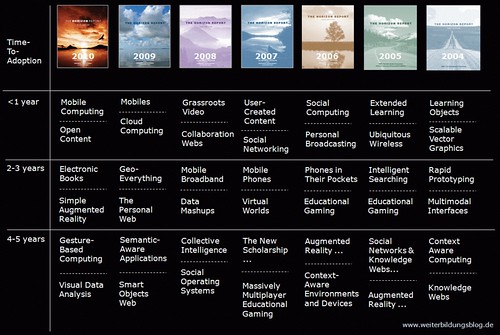
Horizon Report Discussion on Seedlings 112

An early version of the K-12 Horizon Report is out and I get a chance to discuss it (among other things) with the folks at the Seedlings Podcast. In the conversation is Cheryl Oakes, Michael Richards, Bob Sprankle and Wes Fryer.
Horizon Report 2004-2010 by jochen_robes
Horizon Report 2004-2010, a photo by jochen_robes on Flickr.

Friday, April 08, 2011

Online Tests with Google Forms

A high school teacher talks about using Google Forms to create Self-Correcting Tests.


Here are the templates we use for various tests and quizzes. I think the most important take away from this is not have a test correct itself which is worthwhile for teachers because of the time saved, but for the students to receive feedback soquic timely. Used as a quick and immediate check for understanding from the class. The next step is to analyze the data over time and see trends either by student, unit or range of questions.


For an outline of all the videos in the context of a larger educational framework, please visit:

Tuesday, April 05, 2011

Google Docs Collection Management

One of our fifth graders goes over how our students set up their Google Doc Collections (formerly Folders) for the school year.


Once the students and teacher have set up, handing work into their 'virtual inbox' simply becomes as easy as sliding it into a folder (or collection.)


For an outline of all the videos in the context of a larger educational framework, please visit: