Wednesday, September 28, 2011

Google Geo Institute

I had a great time with the team at the Google Geo Institute earlier this week. We primarily covered Google Earth and Google SketchUp but both of these applications are so rich with function, there was plenty to play with!

My students working with Mike Arsenault and Wes Fyer.


We also had the opportunity to meet Toby Lester the author of the book The Fourth Part of the World and see one of National Geographics giant travelling maps. Very cool! You can borrow the map for your own school for kids to check out and they come with a binder of activities and information. Find out more about them here: http://events.nationalgeographic.com/events/special-events/borrow-map


Finally, I met Mike Hathorn a teacher from Hartford Vermont who is doing some amazing things with Sketchup and his kids. I look forward to doing something collaborative with our students this year.


Tuesday, September 06, 2011

Students as Tech Support

This is from one of my presentations at the 2011 Building Learning Communities Conference this summer. The best part is about 20 minutes in where the presentation is taken over by one of my students Kris Redman. He interacts with the educators in the room talking about ways he works with teachers as tech support in R.S.U. #19.

Students as Tech Support BLC11

One of the best aspects of the session came after the camera had been turned off. Kris was chatting with Dave McCollum from Tech Smith about how the skills that he was showing, his poise with adults and his ability to communicate, are skills that cannot be represented by a standard paper resume. And with this video, he would be able to show a real example of what he's capable of. To be honest, for me the most important part of presenting at a conference like BLC is as an educational opportunity for my students. Anytime we can show students that we are learning, just like they are, is always a good thing. (And helping teachers is an added bonus.)


Saturday, August 06, 2011

Russian Interview


At the Sydney Australia GTA last April I meet an educator from Russia. Boris Yarmakhov contacted me recently and asked for an interview. It was really interesting seeing my own words in Russian and I have a better appreciation for the Google Translate feature!

Monday, August 01, 2011

KCI MERIT 2011

Last week I had the opportunity from Rushton Hurley to chat with some educators at the KCI 2011 Merit Program. The topic was The Possibilities of 1:1.

Kern Kelley - The Possibilities of 1:1


Sunday, July 31, 2011

Building Learning Communities Conference 2011


'My students watching Marcos Torres Keynote at BLC 2011.'

Another Building Learning Communities Conference has now come and gone with a slew of amazing presentations, conversations, and ideas. There's too much to unpack here, but I think what surprised/encouraged me the most was people talking about education and using the word love. At least three speakers spoke of love, not in the abstract context of a teacher loving their job or subject area, but how when educators passionately love learning (and working with children) the rest will follow. For my part I discussed district wide implementation of Google Apps for Education and Students as Tech Support.

Unquestionably the coolest thing that happened was presenting with one of my students, Kris Redman. He really knocked it out of the park talking with educators about having students help teachers with technology. In fact, after the session while I was picking up, he convinced TechSmith representative Dave McCollom to give copies of Camtasia to our entire high school!

I'm very proud of him and need to let Dave know that Kris won't be available for employment for a few years yet. :)

Wednesday, July 13, 2011

Summer Tech Institute 2011


The Summer Tech Institute was a great experience for me this year. I was able to work with a terrific group of people. We covered a lot of ground during the week and I'm looking forward to the seeing the projects that the groups begin coming to fruition in the upcoming year.


I ran the Google Tools strand and you can find all that we covered here: www.tinyurl.com/googlesti

Also, http://wbxapp.com/summer-tech is the Mobile Web App one of my students created for the conference.

Tuesday, June 21, 2011

Student Interview


Today one of my students was interviewed for the local news about going to conferences and conducting presentations. A group of students will be joining me at the Summer Tech Institute in Belfast this week.


You can find the entire article here:

Wednesday, May 11, 2011

Handing in Math Work with Google Forms

Mr. Dominick talks about digitizing and handing in paperwork with Google Forms.


One of the significant problems with digital portfolios is that the work has to be in a digital format. That works well in most content areas, but in one like math, it poses a problem. Another issue is the time and effort it takes to digitize the work itself. I believe it's vital for most of that legwork falls upon the student. That way they are learning how to digitize analog (if I can call it that) work, and are responsible for owning their portfolios.


For an outline of all the videos in the context of a larger educational framework, please visit:

Tuesday, May 10, 2011

Google Educast #14


I had the opportunity to chat with Jay Blackman on Google Educast #14. We discuss some of the projects we are working in R.S.U. #19.
The Edreach.us crew has some terrific podcasts covering a variety of educational topics.


Tuesday, May 03, 2011

Ed Tech Crew 158

At the recent GTA Sydney there were a number of us interviewed by newly minted Google Certified Teacher Tony Richards. I'm amazed he was able to fit in so many interviews in such a packed day, but he did it!

EdTechCrew 158

It was great fun speaking with him and you can find the links he mentions here. During the interview, one of the questions he was asked me, (and was kind enough to edit from the final cut) was what future technology would I like to see Google get into? Well, I'd never given that much thought before and since I had a substantial plane ride home I decided to come up with an answer,

"If Larry and Sergey came to me and asked where I

thought Google should go next, what would I say?"

I decided that I'd like them to pursue the wireless spectrum that they once bid on. I start fantasizing about all students having a cheap handheld device, the size of a smart phone with no contract, (probably supported by ads) but with Internet access everywhere. That's the trick isn't it, without ubiquitous access, our students are still split into have and have nots.

At the beginning of the year, I do not ask students how many have the Internet at home, I ask how many have Facebook accounts and typically how many times a day did they check it? Even the students with no net access seem to find those wifi spots when they're motivated.

So that's my tech vision for Google. Internet access for all, hey if Google can't do it, who can?


Friday, April 22, 2011

Google Teacher Academy - Sydney


I was privileged to meet another fantastic group of educators at the Google Teacher Academy in Sydney, Australia. As always it was a treat to work with Danny, Lisa, Dana, Wendy and Mark.

I had a few take aways this trip. The first was how many participants had already adopted Google Apps for Education in their school or district. Shouldn't have been a huge surprise, but it just shows how quickly and globally the tools have spread.


The other realization I came to has to do more with the Googler's themselves. Our group went on the usual tour of the Google offices which is always full of fun surprises around each corner that make you feel you've stumbled into Willy Wonka's Chocolate factory. Primary colored furniture, ample food and crazy toys abound. How many Corporations have a tire swing in the lobby?
All of this brought me to a realization. A primary trait of Googlers has to be restraint. (I realize that generalizing 20,000 people is sketchy at best.) But, working all day with the pull of such surroundings, one would have to develop the fortitude to manage work and play in a way most of us don't experience. And that brings me to education. Are our students in environments where they are able or expected to develop that aptitude. Sure it's easy not to use your phone in class when you know it's going to be taken away, but what about when you're allowed or expected to use it in class and that doesn't mean texting or playing a game. Would I be able to work in a place where food, furniture and fun were steps away. I think I could now as an adult, but as a 16 year old today? With distraction just a click away, I'm not sure where I would have built the ability to read for almost ten hours (thank you flight from Sydney). I'm not sure yet how I fit this with my daily work with kids, but it's certainly something to think about.


Tuesday, April 19, 2011

Managing the Syllabus with Sites and Docs

Mr. Prescott talks about utilizing the Google Site that houses our High School Syllabi. Each syllabus is a Google Doc managed by the teacher, department head and principal.


Teachers are able to make changes to their syllabus while allowing easy access to their department heads and principal. Students then can quickly find work they may have missed or look ahead at what's coming next.


For an outline of all the videos in the context of a larger educational framework, please visit:

Sunday, April 10, 2011

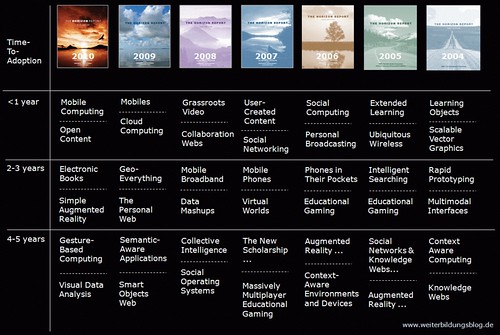
Horizon Report Discussion on Seedlings 112

An early version of the K-12 Horizon Report is out and I get a chance to discuss it (among other things) with the folks at the Seedlings Podcast. In the conversation is Cheryl Oakes, Michael Richards, Bob Sprankle and Wes Fryer.
Horizon Report 2004-2010 by jochen_robes
Horizon Report 2004-2010, a photo by jochen_robes on Flickr.

Friday, April 08, 2011

Online Tests with Google Forms

A high school teacher talks about using Google Forms to create Self-Correcting Tests.


Here are the templates we use for various tests and quizzes. I think the most important take away from this is not have a test correct itself which is worthwhile for teachers because of the time saved, but for the students to receive feedback soquic timely. Used as a quick and immediate check for understanding from the class. The next step is to analyze the data over time and see trends either by student, unit or range of questions.


For an outline of all the videos in the context of a larger educational framework, please visit:

Tuesday, April 05, 2011

Google Docs Collection Management

One of our fifth graders goes over how our students set up their Google Doc Collections (formerly Folders) for the school year.


Once the students and teacher have set up, handing work into their 'virtual inbox' simply becomes as easy as sliding it into a folder (or collection.)


For an outline of all the videos in the context of a larger educational framework, please visit:

Thursday, March 31, 2011

Using a Document Camera in 2nd Grade

Second Grade teacher Mrs. Sherman talks about ways she uses a document camera in the classroom.


It's great to see how excited the kids are using the camera and how many ways the teacher has found to incorporate its use into the day. She's using an Ipevo camera which basically a web cam on an adjustable arm, but it works great an is only about $70.


For an outline of all the videos in the context of a larger educational framework, please visit:

Assessment Data Collection with Forms

Collecting assessment data district wide and analyzing the results.


Here we use Google Forms to collect assessment data. We're able to analyze student scores over time, by grade level, location, or any number of variables we've collected. An important aspect of the data collection that we're working on is having student work included into the data collection. There are many systems that can analyze assessment data, but I think because our kids are already digitizing their work in Google Apps, making that connection between scores and the actual work is an important way for teachers to easily see what those scores represent. An added bonus to this is the ability for the students portfolio to be built at the same time.


For an outline of all the videos in the context of a larger educational framework, please visit:

Wednesday, March 30, 2011

Students as Teacher Webmasters

In this video we chat with one of my students who works as the webmaster for his english teacher.


I really love this. The student webmaster setup is a win-win for everyone involved. The teacher has help keeping their website up to date and the student learns something about working on a project that is real. Anyone can see the work that they've done. Obviously there is a lot of trust involved and it's important that the kids appreciate the professional aspects of showing this public face to parents, administrators, etc. Plus it makes a great portfolio piece for students.


For an outline of all the videos in the context of a larger educational framework, please visit:

Embedding Audio in a Google Site

A tutorial on how to upload an MP3 and embed an Audio Player into a Google Site.


As students become more and more adept with the technology, it's important that they help teach how to use it to others. This can be working with younger students, or providing tech support for teachers.


For an outline of all the videos in the context of a larger educational framework, please visit:

A case for student managed portfolios

One of our students discusses how she uses her digital portfolio to refer to as she needs.


This video really sums up one of the most important reasons for students to take an active role in managing their portfolios. When a students work is digitized and easily accessible, they can refer back to work as needed. The work should build with them over time and provide a resources that they own and have curated.


For an outline of all the videos in the context of a larger educational framework, please visit: